Loading...

TL;DR:
- Proper MLA page numbering places last name and Arabic numeral in the upper right corner on every page.
- Page numbers start at 1 on the first page and continue sequentially through the Works Cited page.
- Consistent, correctly formatted headers improve academic credibility and facilitate source verification.
Formatting errors on MLA papers cost students real points, and page numbers are one of the most mishandled details. You might write a strong argument, cite your sources carefully, and still see your grade drop because your header was missing or misaligned. The rules are actually straightforward once you see them laid out clearly. This guide walks you through exactly where page numbers go, how to set them up in Word and Google Docs, how to handle exceptions, and how to correctly use page numbers in your in-text citations and Works Cited entries.
| Point | Details |
|---|---|
| Upper right placement | MLA page numbers always go in the upper right with your last name and a space. |
| Number all pages | Start at 1 and continue numbering every page, including the Works Cited. |
| Use Arabic numerals | Never use Roman numerals; MLA requires Arabic numbers only. |
| Instructor exceptions | Follow any instructor-specific requirements over standard MLA rules. |
| Cite carefully | In-text and Works Cited citations have different page number rules and formats. |
Many students treat page numbers as an afterthought, something to fix right before submission. That approach causes avoidable mistakes. Getting this right from the start means one less thing to worry about during revision.
MLA format first page setup is where consistent page numbering begins. According to the MLA paper format guide, page numbers in MLA style belong in the upper right-hand corner of every single page, placed 0.5 inches from the top, flush with the right margin, and preceded by the author's last name followed by a space. So if your last name is Garcia, your header reads: Garcia 1, Garcia 2, and so on, all the way through.
This is not just a visual preference. That last name and page number combination allows readers, instructors, and graders to identify your work instantly if pages get separated. It also makes the paper easier to navigate during peer review or office hours feedback sessions.
Here is what the standard MLA header requires:
The MLA running header guide covers the visual layout in detail, but the core rule is consistency. Your header should look identical on page 1 and page 12.
One rule that surprises many students: you do not restart numbering for the Works Cited page. According to the Menlo School MLA Guidelines, pages are numbered consecutively starting from 1 on the first page of text straight through to the Works Cited page using Arabic numerals. If your essay ends on page 7 and your Works Cited follows, that page is numbered 8. There are no exceptions to this under standard MLA rules.
A common misconception: Some students think the Works Cited page operates separately and should start at 1 again. It does not. MLA treats your entire document as one continuous work.
Roman numerals are also off the table. MLA does not use them for page numbering at any point. This distinction matters because some other style guides, like Chicago, do use Roman numerals for front matter. If you switch between styles across different classes, keep this difference clearly in mind.
Now that you know where MLA page numbers go, let's walk through adding them in the two tools most students use: Microsoft Word and Google Docs. Both make the process faster than you might expect, but the steps are slightly different for each.
The MLA paper format guide specifies that the header must use the same font and size as the body text, and both Word and Google Docs can enforce this automatically once you set up your header correctly.
Setting up your MLA header in Microsoft Word:
Setting up your MLA header in Google Docs:
Here is a quick reference comparing both tools:
| Feature | Microsoft Word | Google Docs |
|---|---|---|
| Header menu location | Insert > Header | Insert > Headers and footers |
| Auto page numbers | Insert > Page Number > Current Position | Insert > Page numbers |
| Right-align shortcut | Ctrl+R | Ctrl+Shift+R |
| Font control in header | Yes, manual | Yes, manual |
| Works Cited page separate header | Not needed | Not needed |
Pro Tip: Always scroll through your full document after setting up the header to confirm it appears on every page, including any blank pages at the end or the Works Cited page. A header that looks correct on page 1 can sometimes disappear if section breaks were accidentally inserted.
One common issue in Word is accidentally creating a "different first page" header, which removes the header from page 1. This is actually sometimes what instructors want (more on that below), but if you want it on all pages, make sure that checkbox remains unchecked under Header Design > Options.
For a visual walkthrough of how a properly formatted first page should look, see this sample MLA first page. If your assignment also requires a title page (less common in MLA, but it happens), check the MLA essay title page guide and the MLA cover page guide for specific formatting rules.
Once you master standard placement, it is important to know how to adjust for special instructions. MLA has a default format, but instructors and specific assignment types sometimes call for variations.
The most common exception is omitting the page number on the first page. The MLA paper format guide notes that some instructors prefer no page number on the opening page, with numbering starting from 2 on the second page. This is more common in courses where instructors feel the first page already identifies the student through the standard MLA header block (your name, instructor name, course, and date in the top left corner).
Here is how to handle the most frequent special scenarios:
Pro Tip: Before submitting any paper, paste your instructor's formatting requirements into a checklist and verify each item separately. Many students focus on content during final review and skip mechanical checks like whether the header shows on every page.
It is also worth knowing the difference between how APA vs. MLA page numbers work, especially if you are taking multiple courses with different style requirements. APA, for example, places a running head (a shortened paper title) in the upper left, while MLA uses only the author's last name. Mixing these up is a surprisingly common error.
Understanding why MLA format matters beyond just following rules can also help you stay motivated to get these details right. Formatting is not busywork. It is part of how academic communication works.
With your page numbers set up, understanding how to cite sources accurately is the next key step. MLA in-text citations use the author-page format, which is simpler and cleaner than many other systems.

According to the MACU MLA In-Text Citation Guide, in-text citations use the author's last name and the page number without a comma or the abbreviation "p." between them. So the format is (Smith 45), not (Smith, 45) or (Smith p. 45). You can also integrate the author's name into your sentence: "Smith argues that climate policy requires local buy-in (45)."
For Works Cited entries, the rules for page ranges are more specific. Full ranges are written out when both numbers are under 100 (21 to 48), but for larger numbers you use only the last two digits of the second number, such as 103 to 04 or 395 to 401. For periodicals with non-consecutive pages, use "pp." followed by the first page and a plus sign, for example pp. 45+.
Here is a comparison of common citation situations:
| Source type | In-text format | Works Cited format |
|---|---|---|
| Book with pages | (Garcia 112) | pp. 112-135 |
| Journal article | (Lee 78) | pp. 78-95 |
| Non-consecutive periodical | (Smith 45) | pp. 45+ |
| Website (no pages) | (Garcia) | No page number |
| Video with timestamp | (00:05:42) | Timestamp in entry |
When a source lacks page numbers, such as most websites, the Kennesaw State MLA Text Citations guide is clear: omit the page number entirely. Do not substitute a number you made up or estimated. If the source uses numbered paragraphs, you can use "par." followed by the paragraph number (Garcia par. 4). For chapters in online books, use "ch." For video and audio, use a timestamp formatted as hours:minutes:seconds (00:05:42).
Here is a step-by-step guide to handling missing page numbers correctly:
For deeper coverage of citation formats, the MLA citation guide and the MLA 8th edition guide both offer detailed examples. You can also browse in-text citation examples for a full range of source types, and the journal article citation guide is especially useful for research papers that rely heavily on academic databases.
Here is the honest take: most students view page number formatting as a box to check rather than something that actually affects their grade or reputation. That framing undersells what formatting really communicates.
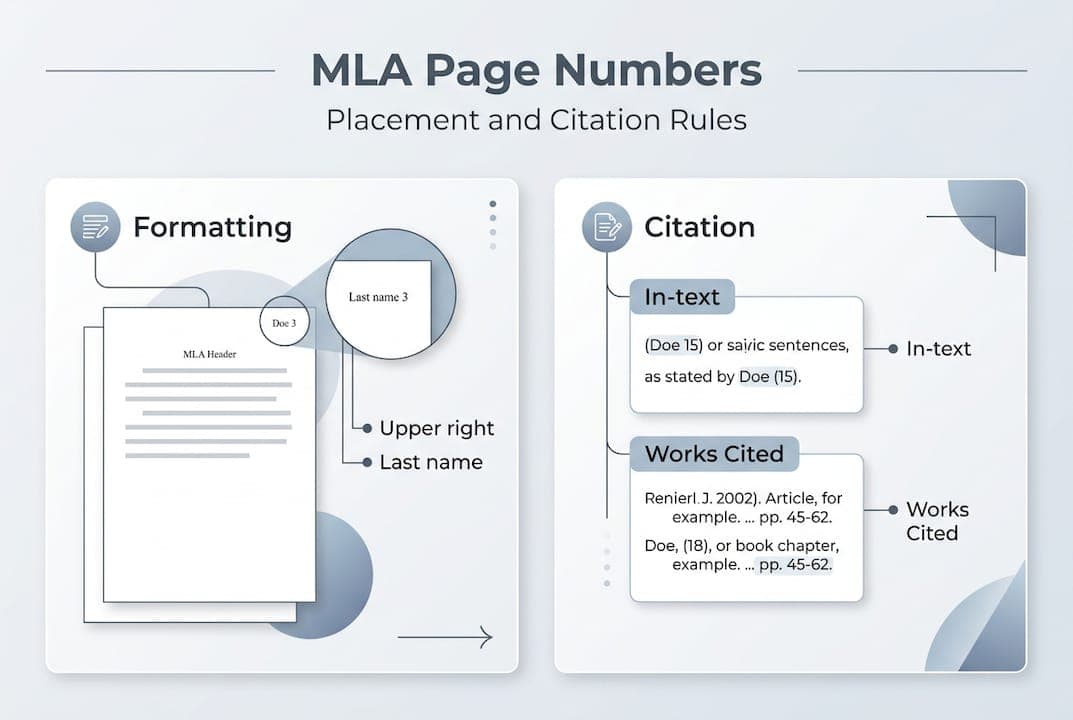
When your paper has consistent, correct headers throughout, it signals to your instructor that you read the style guide, that you care about precision, and that you can follow directions. Those are not trivial impressions. Instructors form opinions about a paper's quality within the first few seconds of picking it up. A missing or misaligned header on page 1 sets a negative tone before a single argument is evaluated.
There is also a practical side. Academic credibility in MLA is partly built on the idea that a reader can locate your exact sources. Page numbers in citations make that possible. When you cite (Smith 45), your reader can go to page 45 of Smith's work and check your claim directly. That is accountability built into the format.
Consistent formatting is not pedantic rule-following. It is professional communication done right.
MLA formatting requires attention to detail across every page of your paper. Even confident writers miss small inconsistencies under deadline pressure. Getting the header right, using correct in-text citation format, and properly numbering through the Works Cited page are all manageable, but they add up fast.

Samwell.ai gives you an AI research paper tool that handles structural formatting while you focus on your arguments. The platform supports MLA compliance built into its output, so your headers, citations, and Works Cited entries follow the right rules automatically. Over 1,000,000 students use it to produce plagiarism-free essays with accurate formatting, real-time AI detection checks, and citation standards built in from the start. Less stress, better papers.
In MLA style, page numbers belong in the upper right-hand corner of every page, preceded by your last name and a single space, placed 0.5 inches from the top.
Yes. The header appears on all pages including the Works Cited page, continuing the same consecutive numbering sequence from the rest of your paper.
Omit the page number and use paragraph, chapter, or timestamp locators when available. The Kennesaw State guide is explicit: never invent locators for unpaginated sources.
Always use Arabic numerals. The Menlo School MLA Guidelines confirm that MLA requires Arabic numerals and explicitly prohibits Roman numerals for page numbering.
Yes, always follow your instructor's specific directions. The MLA paper format guide acknowledges that instructors may prefer no page number on the first page, among other variations.