Loading...
Most essays don't need a separate cover sheet at all. Add one only when a style guide or instructor asks for it. When you do need one, the core fields stay the same across styles: paper title, your name, course or affiliation, instructor name, and due date. Style-specific samples for APA, MLA, and Chicago follow below, so you can copy the right format for your assignment.
TL;DR:
- A cover sheet is usually unnecessary unless your instructor or style guide explicitly requests one, with specific fields varying by format.
- APA student title pages require six specific fields, including course and instructor details, and exclude a running head; all elements are centered and double spaced.
- MLA generally does not require a separate cover page, and relevant information is placed on the first page above the essay, unless specifically requested.
- Chicago and Turabian styles typically have a full page title centered one third down, with less emphasis on strict spacing or additional headers.
- Using an automated generator or templates can help ensure correct formatting and save time, but always double-check instructor instructions for compliance.
Before picking a style, get the basics right. A recommended student title page setup uses Times New Roman 12 point, or a comparable font like 11 point Calibri, Arial, or Georgia. Stick to 1 inch margins on all sides and double spacing, unless your instructor's syllabus says otherwise.
Center the title, usually placed either at the top of the page or about one third of the way down, depending on the style you're following. Use title case (capitalize major words), and skip bold, italics, underlining, or quotation marks on your own paper's title. Page numbers typically go in the top right corner. Student papers usually don't need a running head, but professional manuscripts often do. Check your assignment sheet or LMS instructions first: a professor's specific template always overrides the generic version.
Quick reference for cover sheet basics:
Pro Tip: Save a blank version of whichever cover sheet you use most as a template file. Reusing it cuts formatting errors and saves you the ten minutes you'd otherwise spend re-centering text every time.
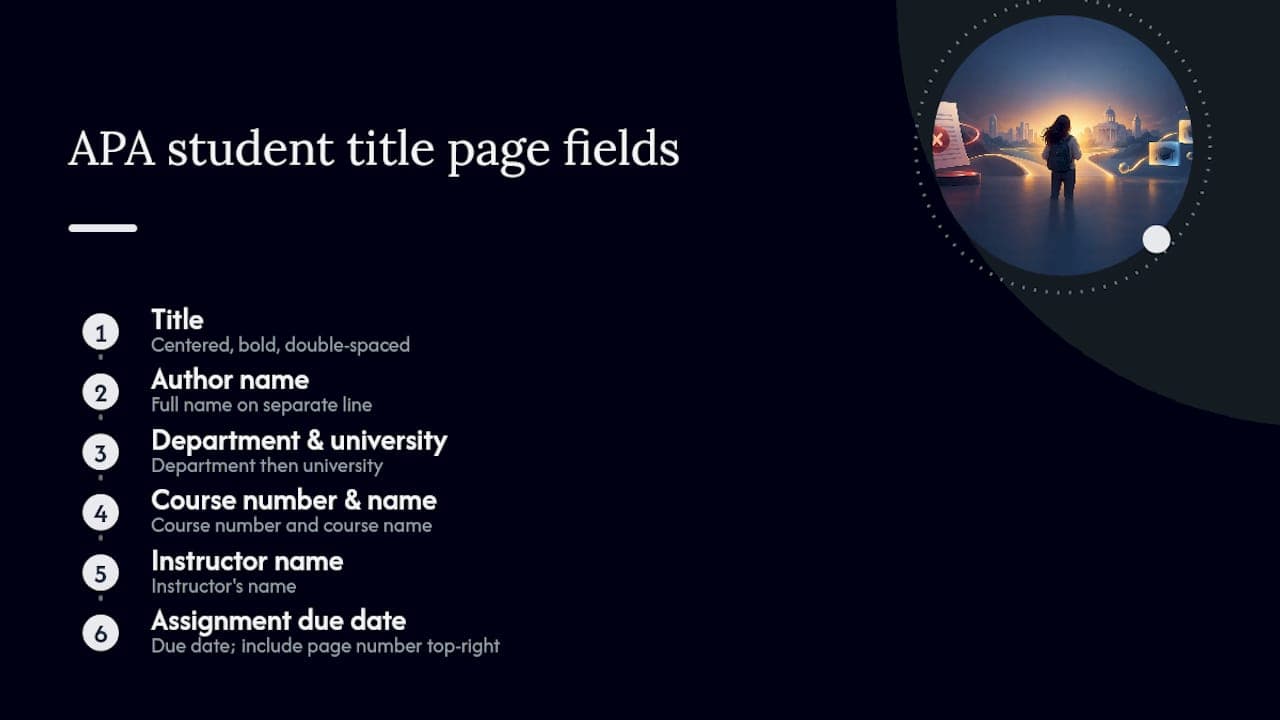
An APA student title page needs six pieces of information, and getting the order right matters more than most students assume. According to Scribbr's APA title page guidance, a student paper includes the title, author name, department and university, course number and name, instructor name, and the assignment's due date.
Student pages skip the running head that professional manuscripts require, but they still carry a page number in the top right corner of every page, starting with the title page itself. That's the main difference between a college essay cover page and one submitted for journal review: professional papers add a running head and often an author note with contact details and funding disclosures. Students almost never need either.
Here's a plain-text APA sample you can adapt directly:
The Effects of Sleep Deprivation on Academic Performance

Maria Chen
Department of Psychology, State University
PSY 301: Research Methods
Professor James Whitfield
October [month and day intentionally omitted]
Every field sits centered and double spaced, with the title in bold. Across the comparisons researchers have run on title page conventions by style, APA consistently requires a separate title page for student work, unlike MLA's default approach.
MLA doesn't require a separate title page by default. Your name, instructor's name, course, and date go directly on the first page of the essay, above the title, followed by a running header with your last name and page number on every subsequent page. That's the entire "cover sheet" in most MLA assignments.
Some instructors ask for a standalone MLA title page anyway, often for longer research papers or group projects. When that happens, keep it simple: university name centered near the top, paper title centered in the middle third of the page, and your name, course name, instructor, and date stacked near the bottom, matching the layout Purdue OWL's MLA guide recommends.
A minimal MLA title page sample looks like this:
State University

The Role of Memory in Modern Fiction

Daniel Ortiz
ENGL 210: Literary Analysis
Dr. Susan Mercer
14 October 2026
Note the day-month-year date format, common in MLA-style examples. If your instructor hasn't mentioned a separate page, skip it. For a full walkthrough of building one from scratch, see this guide to creating an MLA cover page.
Chicago and Turabian papers commonly use a separate title page, and the layout follows a distinct visual rhythm compared to APA or MLA. The title sits centered about one third of the way down the page, with your name, course information, instructor, and date following several lines below, all centered and using Times New Roman as the preferred default font.
The title page itself typically isn't numbered, even though it counts as page one in the overall page count. Numbering starts appearing on page two.
A copy-ready Chicago sample:
The Economic Impact of Remote Work Policies

Rachel Kim
History 405: Contemporary Economic Trends
Professor Alan Baxter
October [month and day intentionally omitted]
Check citation formatting once your title page is set using this Chicago in-text citation reference.
Word and Google Docs both ship with built-in title page templates that already handle margins and spacing correctly, which makes them the fastest option for a plain academic submission. If you want something more visual for a printed project or a class that allows design flair, Canva's essay cover page templates offer editable layouts you can export as PDF, JPG, or PNG.
Decorative templates work fine for print handouts or presentation covers. They're the wrong call for text-only LMS uploads, timed exam submissions, or anything routed through an application portal, where extra formatting often gets stripped or flagged.
Before you submit:
Pro Tip: When you're not sure whether a cover sheet is expected, reread the assignment prompt for the word "title page." If it's silent and you're submitting through a text box, leave the cover sheet out entirely.
Small formatting errors on a cover sheet are an easy way to lose points before a grader even reads your argument. The samples above follow the placement and field rules set by Purdue OWL, Scribbr, and Metro State's Chicago/Turabian guidance, three of the sources instructors themselves cite most often.
Citation editor tools can apply field requirements automatically when generating a paper, so the title page matches the selected style without manually tracking every margin rule. Editing tools can adjust formatting on existing drafts, and guided essay features help build the structure around a compliant title page from the start. For more formatting breakdowns like this one, Samwell's blog covers essay header formatting and full APA student paper rules in more depth.
Instructor instructions beat every generic rule in this article. If your professor's syllabus contradicts something written here, follow the syllabus. Some formatting tools are built around the principle of matching the style guide precisely but letting specific assignment instructions override defaults. That's why the platform auto-populates title pages rather than forcing one rigid template on every paper.
— Tilen
Copying a sample into a blank document works, but it still leaves you responsible for every margin, spacing rule, and field placement. Some essay generators auto-populate a compliant title page upon selecting APA, MLA, or Chicago, incorporating course details and instructor name to avoid retyping templates.
The Citation Editor formats the page and the references list to the same standard, and the Power Editor lets you adjust structure or expand sections without breaking that formatting. Once your draft is ready, export it as a clean PDF from the writing platform. If you're working on a longer assignment, the same tools apply to a full research paper or a literature review. Check the Academic Plan and Custom Professional Plans to see which unlocks the export features you need for the current semester.
Center the title in title case, then list your name, course or affiliation, instructor name, and due date beneath it, following the spacing rules of whichever style guide you're using. APA and Chicago typically require a full separate page; MLA usually doesn't unless requested.
The word count flexibility rule usually allows an essay to run somewhat over or under an assigned length without penalty. It has nothing to do with cover sheet formatting, and definitions vary by instructor, so confirm the specific rule on your assignment sheet.
A cover page example centers the paper's title, then lists the author's name, course or department, instructor, and date below it, all double spaced. The exact layout shifts by style. Comparisons across APA, MLA, and Chicago show APA and Chicago using a full separate page while MLA folds the same information into the first page's header.
No. MLA style places your name, instructor, course, and date directly on the first page above the essay title, with no separate cover page required. Add one only if your instructor specifically asks for it, using the minimal layout Purdue OWL recommends.
Yes. Samwell's essay generator auto-populates the required fields for APA, MLA, or Chicago and formats them according to each style's placement rules, then lets you export the finished page as a PDF through the essay creator tool.