Loading...

The fastest way to summarize an article with AI is matching the tool to the job, not picking the most popular name. Chat-style LLMs like ChatGPT (OpenAI) handle flexible Q&A and mixed formats. PDF-first summarizers such as Adobe Acrobat's AI Assistant chew through long reports and academic PDFs section by section. Browser extensions grab a webpage in one click. Citation-aware tools matter most when the summary has to survive an MLA or APA-style check, which is where most casual summarizers fall apart for students and researchers.
Here's the shortlist by job:
Test any of these in under two minutes. Paste one article, generate a summary, then check two sentences from the summary against the original text. If the tool can't point you back to the source passage, that's your answer about whether to trust it for anything that matters.
Match the summarizer category to the job, verify at least two claims against the source, and treat every AI-generated summary as a first draft rather than a final answer.
| Point | Details |
|---|---|
| Match tool to job | Use chat-style LLMs for flexible Q&A, PDF-first tools for long reports, extensions for quick reads, and automation tools for recurring digests. |
| Test in under two minutes | Run one article through your shortlisted tool and check the output before trusting it with anything important. |
| Verify two sentences every time | Cross-check specific claims from the summary against the original source text before citing or acting on them. |
| Check data retention before uploading | Confirm how long a tool stores your documents, especially for unpublished drafts or academic work. |
| Academic work needs extra rigor | Use Samwell's research paper summary guidance to convert summaries into properly cited, verified notes. |
Comparing tools by name gets old fast because the market shifts every few months. Comparing by category doesn't, because the tradeoffs are structural. A browser extension is fast because it's usually doing lighter, extractive work. A PDF-first tool is slower but gives you section-level detail a browser extension can't. Once you know which category fits your job, picking a specific product takes five minutes.
Five categories cover almost everyone reading this: chat-style LLMs (ChatGPT and similar general-purpose assistants), PDF-first document summarizers (Adobe Acrobat's Generative Summary feature and comparable tools), browser-extension summarizers (Wordtune Read and similar reader-view tools), automation and workflow summarizers (Lindy and other API-connected agents), and social-reading or highlight-based summarizers (Glasp, which pulls from your own highlights and notes across the web).
| Category | Best for | Price / free tier | Supported input types | Summary styles | Privacy & data retention | Speed & ease of use | Integration options | Accuracy / faithfulness |
|---|---|---|---|---|---|---|---|---|
| Chat-style LLMs | Flexible Q&A, custom prompts, mixed formats | Free tier available; paid tiers unlock longer context and faster responses | Copy-paste text, URLs (with browsing enabled), some file uploads | TL;DR, bullets, executive summary, custom tone | Varies by provider; check retention settings before uploading sensitive documents | Fast for short text; slower on very long documents | Browser access, plugins, some API access | Mostly abstractive; quality depends on the prompt |
| PDF-first summarizers | Long reports, academic papers, contracts | Free tier with limits; paid plans for larger files and full features | PDF, DOCX, scanned documents | Section-level summaries, adjustable length | Files often processed in the cloud; check retention policy per provider | Moderate speed; strong on structure | Works inside existing document workflows | Blends extractive highlights with abstractive rewriting |
| Browser-extension summarizers | Quick reads of web articles, news, blog posts | Usually free with optional paid tier | Webpages via URL or reader view | Short bullet summaries, TL;DR | Client-side processing common, but varies by extension | Fastest option, often near instant | Browser only, limited export | Frequently extractive, which trades nuance for speed |
| Automation and workflow tools | Recurring summaries, team digests, pipelines | Free tier limited; paid plans for volume and integrations | URLs, emails, connected apps | Custom formats defined by workflow rules | Data often passes through third-party APIs; review each connector | Fast once set up, but setup takes time | Deep integrations (Slack, email, CRMs, APIs) | Depends on underlying model; verify with spot checks |
| Highlight-based readers | Personal knowledge management, research collections | Free with core features; paid for advanced organization | Highlighted text, saved articles, personal notes | Compiled summaries from your own highlights | Stores your saved content; check export and deletion options | Moderate, since it depends on your highlighting habit | Browser extension, some note-app integrations | Extractive by design since it pulls your own selected text |
Here's the tradeoff nobody mentions upfront: the fastest tools tend to be the least rigorous. Browser extensions that summarize a page in two seconds are almost always doing extractive work, pulling sentences the algorithm thinks are important rather than genuinely understanding argument structure. PDF-first tools take longer because they're parsing document structure, headers, and sections before generating anything.
Pro Tip: Run the same article through two categories, a chat-style LLM and a browser extension, and compare one sentence from each summary against the source text. The gap tells you exactly how much each tool is compressing versus reinterpreting.
Pick based on job fit first, then narrow by the technical details that actually affect your output. Skipping straight to "which one is free" is how people end up with summaries they can't verify.
Run through this checklist before you commit to any tool for repeated use:
Before you rely on a new summarizer, ask it (or its documentation) these questions directly:
Watch for these red flags, because they show up more often than you'd expect. Opaque data retention policies that never specify how long your document sits on a server. No way to trace a summary's claims back to specific sentences in the source. A single fixed output style with no length or tone control. And quietly enforced input limits, where a tool caps you at a set number of characters, such as the 25,000 to 60,000 character range some summarizers declare, and truncates the rest without a clear warning.
This workflow works whether you're using a chat-style LLM, a PDF tool, or an extension. The steps stay the same. Only the interface changes.
These prompt templates work in any chat-style interface, regardless of which model is behind it:
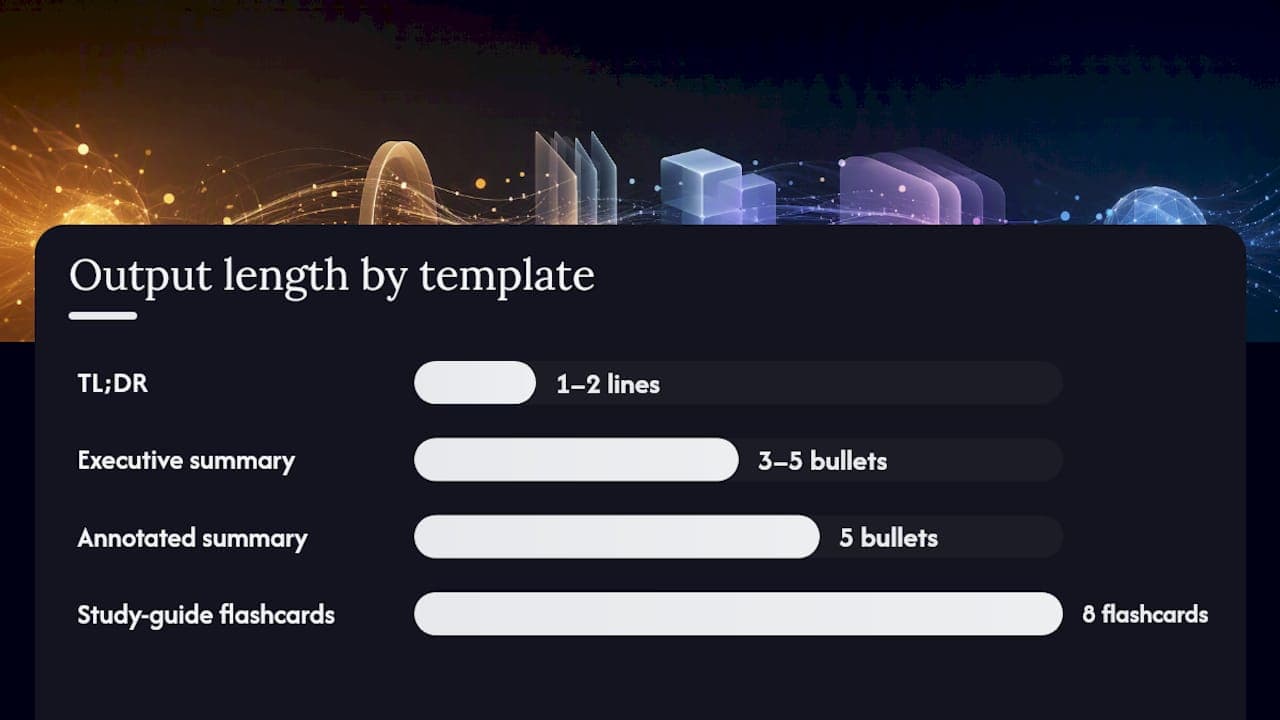
TL;DR (one to two lines): "Summarize this article in one to two sentences, focusing only on the main conclusion or finding."
Executive summary (three to five bullets): "Give me a three to five bullet executive summary of this article. Each bullet should cover a distinct point: the core argument, key evidence, and any stated implications or recommendations."
Annotated summary with passage citations: "Summarize this article in five bullets. For each bullet, include the exact sentence from the source text that supports it."
Comparison summary across multiple articles: "Compare these two articles. Summarize where they agree, where they disagree, and note any claims that appear in one but not the other."
Study-guide flashcards: "Turn this article into eight flashcards. Each flashcard should have a question on one side and a one-sentence answer on the other, based only on facts stated in the text."
A few category-specific tweaks help. For PDF-first tools, ask for section-level summaries instead of one blended output, since Adobe's Acrobat AI Assistant and similar tools are built to break long documents into digestible chunks. For chat-style LLMs, paste a short outline or headings list first if the document is long. It anchors the model's attention. For browser extensions, always switch to reader view before summarizing. Skipping that step means the tool sometimes summarizes navigation menus and cookie banners along with your actual content.
Pro Tip: Before you trust any summary for something that matters, pick two sentences from it and search for the matching passage in the original article. If you can't find a close match in under 30 seconds, treat the summary as a rough draft, not a final answer.
Students and researchers need a different bar than someone skimming news over coffee. A summary that's 90% accurate is fine for deciding whether to read an article. It's not fine for citing in a paper.

Treat the AI-generated summary as a first draft, not a finished product. Pull out the thesis, the main claims, and the methodology (if it's a study or research paper) as a separate step. Annotate which passages in the source support each claim you plan to cite, and convert that into structured notes before you ever start drafting. This is exactly the workflow Samwell's research paper summary guidance walks through in more depth, and it maps directly onto standard citation checks under both MLA and APA formats.
Before you cite anything from a summary, run it through this verification pass:
Not all summarizers handle citations the same way, and that difference matters more than most people realize. Extractive tools copy key sentences directly, which is safer for verbatim quotes because the wording hasn't changed. Abstractive tools rewrite everything, which reads more smoothly but introduces more room for subtle distortion. For anything citation-critical, favor tools that mark which sentences are extractive versus rewritten, and treat rewritten claims as needing an extra verification step. Some free academic-oriented tools, including Scribbr's text summarizer, offer a toggle between the two modes specifically so users can choose the safer option for direct quotes.
You can ask an AI tool to generate an APA or MLA citation stub for a source. It saves time. It also gets bibliographic details wrong often enough that you should never submit one without checking the author name, publication date, and page numbers by hand. Samwell's guide to AI citation generators covers which fields tend to need the most manual verification.
Speed varies more by input type and length than by which tool you pick. A short news article, under 1,000 words, summarizes in a chat-style LLM in a few seconds regardless of which model you're using. The bottleneck isn't processing time. It's how long it takes you to paste the text and read the output.
PDF-first tools take longer, usually somewhere between 10 and 30 seconds for a typical report, because they're parsing document structure before generating anything. A 40-page academic paper or a dense government filing can push past a minute, especially if you're asking for section-level breakdowns instead of one blended summary.
Browser extensions are the fastest category almost by design, often returning a summary in under five seconds. That speed comes from lighter extractive processing rather than deep comprehension, which is exactly why they're best suited to quick triage rather than anything you plan to cite.
Automation tools like Lindy behave differently because the "summary" isn't something you wait for interactively. It happens in the background as part of a workflow, so an article gets summarized and routed to your inbox or Slack channel before you'd even think to check. The tradeoff is setup time upfront in exchange for zero wait time later. Real user feedback on G2's review page for Lindy reflects this pattern: people report strong satisfaction once a workflow is configured, alongside a learning curve during initial setup.
I run almost everything I read through a quick AI summary first, whether it's a long article, a research paper, or a report someone sent me before a meeting. It's triage, not comprehension. If the summary tells me the piece isn't relevant to what I'm working on, I move on and never open the full text. If it looks relevant or if I'm going to cite it, reference it, or make a decision based on it, I read the source directly and use the summary only as a map of where to look.
The habit that's saved me the most time isn't the summarizing itself. It's marking, in the moment, which summaries need a follow-up read and actually scheduling that ten to fifteen minute block before I forget why the article mattered in the first place. A summary you never verify is just a guess wearing a confident tone. Treat every AI summary as a strong first pass and you'll get the speed benefit without inheriting the risk.
Can AI accurately summarize a long article without missing key points?
It depends on the tool and the input length. Most chat-style LLMs and PDF-first summarizers do a solid job on articles under a few thousand words, but accuracy drops on very long or highly technical documents unless you ask for section-level summaries. Always verify by checking two claims against the source text.
What's the difference between extractive and abstractive summarization?
Extractive summarizers copy key sentences directly from the source, which preserves exact wording but can feel choppy. Abstractive summarizers rewrite the content in new language, which reads more smoothly but carries a higher risk of subtly changing meaning. For academic citations, extractive output is generally safer.
Is it safe to upload sensitive documents to a free AI summarizer?
Not always. Data retention policies vary widely between free tiers, and some tools store uploaded content longer than users expect. Check the privacy policy before uploading anything unpublished, confidential, or containing personal information.
Do free AI summarizers have input length limits?
Most do. Free tiers commonly cap input at a set character or file-size threshold, and some tools truncate longer documents silently rather than warning you. Check the tool's stated limits before uploading a long PDF or pasting a full article.
Can I use an AI summary as a direct citation in academic writing?
No. Treat an AI-generated summary as a starting point for your own note-taking, not a citable source. Always verify quoted passages against the original text and confirm bibliographic details manually before using MLA or APA citation formats.
A few Samwell resources go further into specific pieces of this workflow. If you're building AI into a broader research process, why use AI in research covers the productivity case in more depth. For turning summaries into properly structured notes, the research paper summary guide walks through the annotation process step by step. Students juggling multiple readings a week will get more mileage from the practical tips for students on managing AI-assisted study workflows.
For testing summarizers yourself, two neutral, non-vendor sources make useful practice inputs. A long-form Wikipedia article on medieval agriculture has the headings, citations, and neutral tone that make it a solid stress test for accuracy. Academic material from a source like the University of Illinois reflects the kind of dense, citation-heavy writing students and researchers summarize most often, and it's a fair benchmark for whether a tool preserves nuance or flattens it.